Setup Guide
Windows Setup Guide
Follow these 2 simple steps to get Interview Cracked running perfectly on your PC.
1
Download & Install
Get the latest version of the app.
Download Page
Run the installer executable (.exe) after downloading.
2
First Run
Launch the app and handle Windows security check.
Windows SmartScreen prevented an unrecognized app from starting.
If you see this popup:
1. Click "More info"
2. Click "Run anyway"
Why is this okay? This is standard for any new app that hasn't built up a long history with Microsoft yet. It simply means we are a fresh, exclusive tool.
Double-click the .exe or shortcut to start.
Getting "DLL initialization routine failed"?
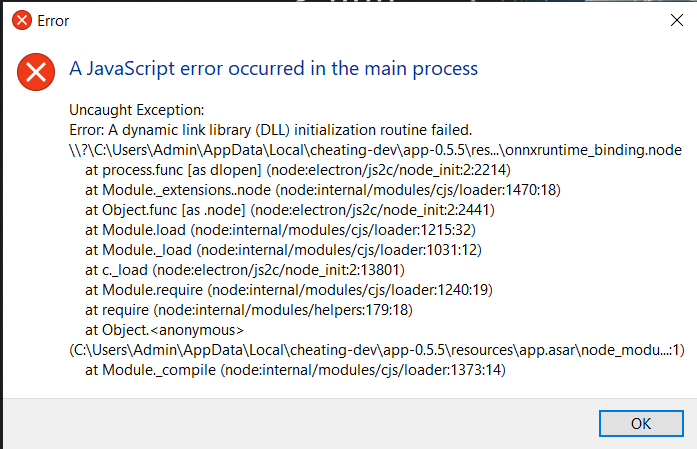
Error: A dynamic link library (DLL) initialization routine failed... onnxruntime_binding.node
Don't worry, this is a common issue on Windows. It just means your PC is missing a standard Microsoft component required for our AI engine to run accurately.
1
Download Visual C++ Redistributable
Click here to download (Official Microsoft Link)2
Install & Restart
Run the installer, then Restart your PC. The app will work perfectly after this.
Ready to Dominate?
Return Home